
Work Orders for Repair Shops
Free Repair Work Order Software for Computer Repair Shops
Use a Repair Tracker and your own work order or ticket number to connect the job, customer, device, parts, approvals, notes and completion history.
Free software. No trial. No required parts purchases.
Create Free Repair Center AccountSee How It Works
- Free Repair Management
- 10% Off TechStockHouse Parts
- Integrated Parts RFQs
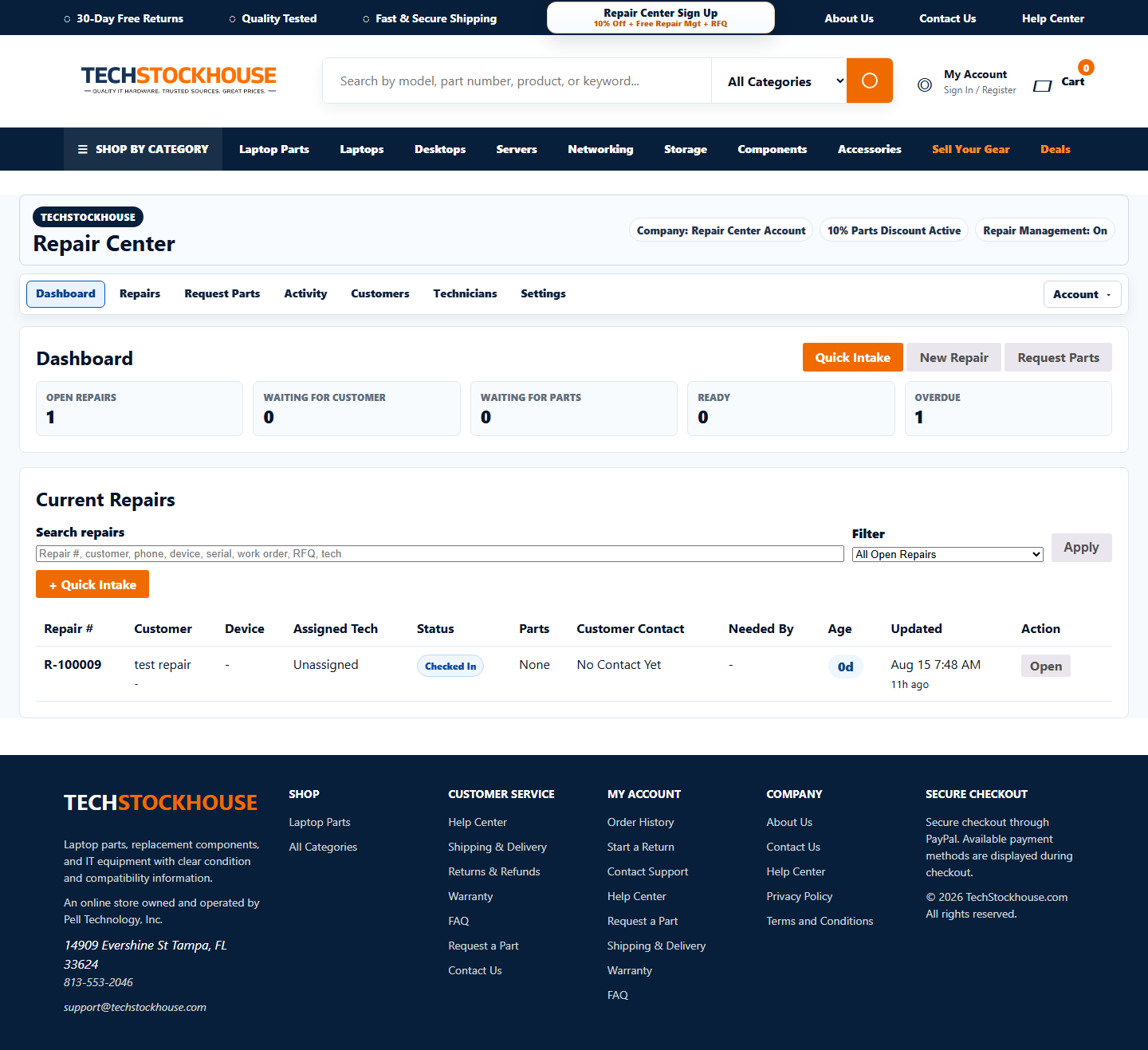
Actually Free
No software subscription.
Built for Repair Shops
Customers, devices, technicians and repairs.
Parts Built In
Use TechStockHouse, your inventory or another supplier.
Your Data Is Portable
Export your repair-management records.
Work Orders Connected to Repairs
Use your own Work Order or Ticket number alongside the permanent Repair Tracker number.
The repair record connects the work order to customer, device, technician, status, notes, approvals, parts, tracking and completion.
Parts and RFQs on the Same Job
When a work order needs a motherboard, LCD, keyboard, battery or other part, the RFQ or manual part record can stay linked to that repair.
This keeps the job understandable without forcing every part through TechStockHouse.
Keep Billing Separate
Repair Center focuses on repair operations. Shops can keep using QuickBooks, POS or their existing billing system for customer invoices and payments.
Repair Center Features
Everything a Computer Repair Shop Needs to Stay Organized
Repair Tracking
Repair Tracker numbers, status, Needed By, aging and history.
Parts Management
Track needed, ordered, received and installed parts from any source.
Parts RFQs
Request parts manually or upload larger RFQ spreadsheets.
Customer Contact Tracking
Track calls, voicemail, prepared emails and customer notification status.
Returns & Refunds
Keep purchase, shipment, return and refund history linked.
Data Export
Export the shop customers, devices, repairs and operational history.
How it works
Run the Repair From One Place
From check-in to completed repair, keep the entire job connected.
Check In
Customer, device, serial and Repair Tracker.
Diagnose
Assign a tech, add notes and use checklists.
Source Parts
Use your inventory, TechStockHouse or another supplier.
Track Progress
Parts, approvals, customer contact and repair status.
Complete
Final testing, customer notification and complete repair history.
Built for daily shop use
One Workspace for Repairs, Parts and Customer Updates
Keep assigned technician, parts status, customer contact history, repair tracker numbers and daily repair work in one organized Repair Center workspace. Shops that need deeper status visibility can review the repair tracking tools, while counter teams can explore repair ticket intake.
- Assigned Technician
- Parts Status
- Customer Contact History
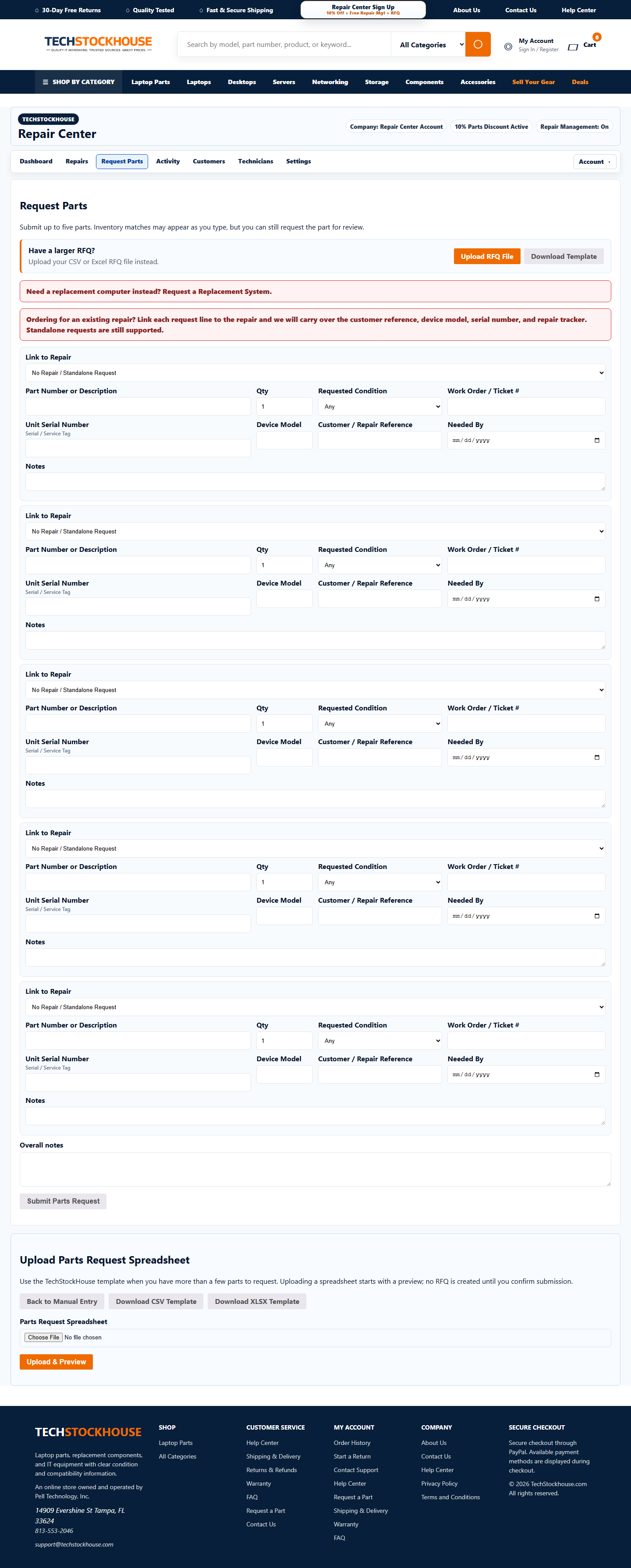
Parts sourcing built in
Need a Part? Request It Without Leaving the Repair
Enter a part number or description, add device model and unit serial or service tag when helpful, submit up to five lines manually, or upload a spreadsheet for larger RFQs. Laptop shops can see how those details fit into a laptop-specific repair workflow.
TechStockHouse can respond with condition, price and ship date. If your shop uses another supplier, Repair Center still lets you track that part inside the repair.
What you get for free
Feature Comparison
| Feature | Repair Center |
|---|---|
| Repair Tracking | Included |
| Customer & Device Records | Included |
| Technician Assignment | Included |
| Quick Intake | Included |
| Printable Repair Tickets | Included |
| Repair Checklists | Included |
| Customer Status Lookup | Included |
| Parts RFQs | Included |
| Parts Tracking | Included |
| Shop Inventory | Included when enabled |
| External / Customer-Supplied Parts | Included |
| Warranty / Comeback Repairs | Included |
| Data Export | Included |
| Customer billing/payment processing | Use your existing system |
| Software Subscription | $0 |
Your Repair Data Is Yours
You can export customers, devices, repairs and repair history when you want. Your shop data stays portable, and TechStockHouse private sourcing/vendor/cost details are not mixed into your export.
FAQ
Common Questions
Is TechStockHouse Repair Center really free?
Yes. Repair Center accounts can use the repair-management software without a software subscription.
Is this a free trial?
No. The Repair Center software is not positioned as a time-limited free trial.
Do I have to buy my repair parts from TechStockHouse?
No. You can track your own inventory, parts from TechStockHouse, parts bought elsewhere and customer-supplied parts.
Can I track parts I buy somewhere else?
Yes. You can record supplier, cost, order reference, tracking, received status and installed status for externally sourced parts.
Can customers check their repair status?
Yes. Customers can use the public repair status page with their Repair/Ticket number.
Can I assign repairs to technicians?
Yes. Repairs can be assigned and reassigned to technicians.
Does it include repair shop inventory management?
Shop inventory tools are built into Repair Management and can be enabled for a Repair Center company.
Can I export my repair-shop data?
Yes. Repair shops can export their own repair-management data.
Does TechStockHouse process my repair customer payments?
No. Use your existing billing, POS or accounting system for your customer payments.
Can I submit parts requests if I do not know the part number?
Yes. You can submit a description, device model and unit serial or service tag so TechStockHouse can review the request.
Software resources
Explore Repair Center Software
Start Using Repair Center for Free
Manage repairs, track parts, organize technicians and submit RFQs - with no software subscription.
Create Free Repair Center AccountExplore Repair Center
Free Repair Management · 10% Off Eligible Parts · No Required Parts Purchases